Mastering 3D Paper Bees with Cricut Templates
There is a distinct satisfaction in watching a flat sheet of paper transform into a textured, dimensional object that seems ready to take flight. For crafters who love the precision of digital cutting machines, finding the right design files can make the difference between a project that looks amateur and one that looks professionally curated. The Bee Layered 3D Template for Cricut offers exactly this kind of versatility, serving as a foundational tool for anyone looking to add depth and character to their creative endeavors. Whether you are a seasoned scrapbooker or a small business owner launching a line of handmade goods, understanding how to leverage these layered designs opens up a world of possibilities.
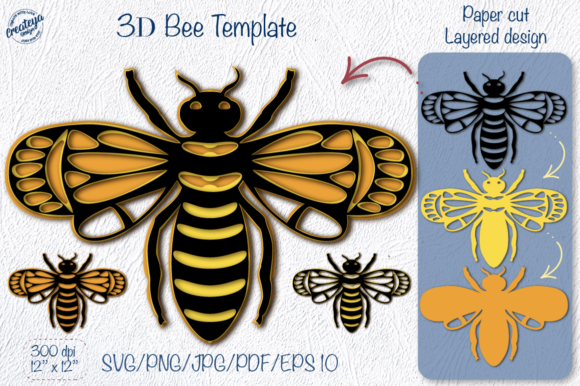
At its core, a layered 3D template is a digital blueprint designed to be cut in stages. Unlike a standard silhouette where the entire image is cut from a single piece of material, a layered file breaks the image down into multiple components. In the case of a bee design, this might include separate layers for the wings, the body segments, the stripes, and even subtle shadow elements that create the illusion of depth when stacked. When you use a Layered Bee SVG, your cutting machine reads each layer as a distinct path, allowing you to cut them from different colors of cardstock, vinyl, or heat transfer material. Once cut, these pieces are assembled, usually with adhesive foam tabs or glue, to build a physical structure that pops off the page.
Why Choose Layered Designs for Your Projects
The primary appeal of using a Bee Layered 3D Template for Cricut lies in the professional finish it provides without requiring advanced artistic skills. Creating a 3D effect manually by drawing shadows and highlights can be time-consuming and often yields inconsistent results. Digital layered files solve this problem by pre-engineering the depth for you. This ensures that every time you run the cut, the proportions are perfect, and the layers align seamlessly.
For beginners, this removes the intimidation factor of complex papercrafting. You do not need to know how to shade or sculpt; you simply need to follow the cut order and assemble the pieces. For professionals, it saves valuable production time. If you are making fifty greeting cards for a local market, consistency is key. These templates guarantee that card number one looks identical to card number fifty, maintaining high quality across your inventory.
Furthermore, the flexibility of these files supports a wide range of materials. While they are perfect for cardstock in paper crafts, the same SVG data can be applied to adhesive vinyl for smooth surfaces or heat transfer vinyl (HTV) for fabrics. This adaptability means a single purchase can fuel multiple types of projects, from home decor to wearable art.
Endless Applications for Home and Business
The utility of a Layered Bee SVG extends far beyond a simple greeting card. One of the most popular uses is in digital scrapbooking. By importing the PNG files included in the download into your layout software, you can add realistic, shadowed bee elements to your digital pages before printing them out or sharing them online. The high resolution (300 DPI) ensures that these images remain crisp even when printed at larger sizes.
For those who love tactile crafts, papercut bee decorations make stunning wall art. Imagine a gallery wall featuring a swarm of bees in varying sizes, created by scaling the SVG file up or down. Because the files are vector-based, you can resize them infinitely without losing quality. This is ideal for creating focal points in nurseries, kitchens, or garden-themed rooms.
Entrepreneurs and side-hustlers will find significant value in using these designs for merchandise. A Tumbler design featuring a cute, layered bee can be cut from permanent vinyl and applied to stainless steel cups, a highly sought-after item in the crafting community. Similarly, these designs work beautifully on mugs when used with the appropriate dishwasher-safe vinyl or sublimation techniques if the raster files (JPG/PNG) are utilized. The inclusion of both color and black-and-white versions in the package allows for creativity in monochrome aesthetics or vibrant, multi-colored displays.
Iron-on applications are another strong suit for these files. Using the vinyl decals capability, you can create custom t-shirts, tote bags, or aprons. A bee motif is particularly popular for teacher gifts, gardening clubs, or spring-themed events. The layered aspect allows you to use different colored HTV for the body and wings, adding a level of detail that single-color cuts cannot achieve.
Understanding the File Package and Formats
When you acquire a comprehensive design bundle like this, it is important to understand what you are receiving to maximize its potential. Typically, you will receive a ZIP folder containing organized subfolders. This organization is crucial for workflow efficiency, allowing you to grab only the file type you need for your specific software or machine.
- SVG Files: The Scalable Vector Graphics file is the gold standard for cutting machines like Cricut Design Space and Silhouette Studio. It retains the layer information, allowing you to ungroup the bee into its constituent parts for multi-color cutting.
- PNG Files: Portable Network Graphics files are essential for digital design and printing. The package usually includes versions with transparent backgrounds, some with drop shadows already rendered, and others in black and white. These are perfect for "Print then Cut" projects or digital composition.
- JPG Files: High-resolution Joint Photographic Experts Group files are universally compatible. They are excellent for quick previews, inserting into documents, or uploading to platforms that do not support transparency but require high-quality imagery.
- EPS Files: Encapsulated PostScript files are geared toward professional graphic designers using software like Adobe Illustrator or CorelDRAW. They offer advanced editing capabilities for those who wish to modify the vector paths further.
- PDF Files: Useful for viewing the design on any device without specialized software and often serve as a reference guide for assembly or coloring pages.
Having access to files organized by file type streamlines your process. If you are sending a design to a professional printer, you might reach for the EPS or high-res JPG. If you are loading your Cricut for an afternoon of card making, you will head straight for the SVG folder. This thoughtful organization respects your time and reduces the friction often associated with digital downloads.
Practical Tips for Best Results
To get the most out of your Bee Layered 3D Template for Cricut, consider a few practical observations before you start cutting. First, always check the "mirror" setting if you are using Heat Transfer Vinyl (HTV). Since iron-on materials are applied upside down, failing to mirror your image will result in reversed text or asymmetrical designs. For standard adhesive vinyl or cardstock, mirroring is generally not necessary unless the design has specific directional elements.
Material selection also plays a huge role in the final look. For 3D paper bees, use cardstock with a weight of at least 65 lbs to ensure the layers hold their shape and do not curl excessively over time. If you are creating delicate wing details, a slightly lighter paper might allow for more intricate cuts, but ensure your machine settings are calibrated correctly to avoid tearing.
Assembly is where the magic happens. When stacking the layers, use 3D foam adhesive squares rather than liquid glue for the best dimensional effect. This creates a small gap between the layers, casting real shadows and enhancing the 3D illusion. If you are using the files for flat applications like mugs or tumblers, ensure the surface is clean and free of oils to prevent the vinyl from peeling later.
It is also worth noting that while the preview images often show the design on specific backgrounds or in framed settings, these are for illustration purposes only. The actual download contains only the digital files described. No physical items, mats, or tools are included, so ensure you have the correct software installed on your computer or tablet to open and manipulate these file types before purchasing.
Ultimately, integrating a Layered Bee SVG into your creative toolkit is about expanding your horizon. It bridges the gap between digital convenience and handmade charm. Whether you are crafting a heartfelt gift for a friend, decorating your home for the season, or producing items for your small business, these templates provide the reliability and aesthetic quality needed to bring your ideas to life. With instant download availability, you can go from concept to creation in a matter of minutes, spending less time searching for designs and more time enjoying the craft itself.