School Classroom 3D Icon Pack: Bringing Learning to Life
Whether you're designing a website for a school, creating educational content, or developing an app for students, visuals play a crucial role in engaging your audience. The School Classroom 3D Icon Pack offers a versatile and professional set of icons that can help bring your ideas to life. With its blend of playful realism and soft matte textures, this pack is perfect for anyone looking to add a friendly, approachable feel to their digital projects.
What Is the School Classroom 3D Icon Pack?
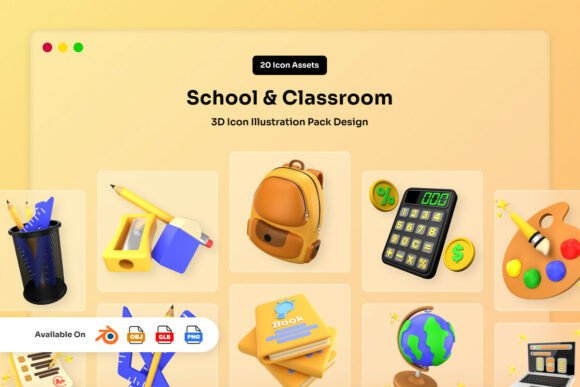
The School Classroom 3D Icon Pack is a collection of 20 unique 3D assets designed to represent classroom elements, learning tools, and academic concepts. Each icon features smooth rounded forms and balanced lighting, giving it a warm and inviting look. The design strikes a balance between realism and creativity, making it ideal for use in web design, apps, presentations, and more.
These icons are not just visually appealing—they’re also highly functional. They come in multiple formats, including Blender files, OBJ files, GLB files, and high-resolution PNGs, making them easy to integrate into different projects. Whether you're working with 3D modeling software or need transparent icons for a website, this pack has you covered.
Where and When to Use the School Classroom 3D Icon Pack
Imagine you're a teacher creating a presentation for your students. You want the slides to be engaging but not overwhelming. Using icons from the School Classroom 3D Icon Pack can help break up text and make complex ideas easier to understand. A simple icon of a book or a pencil can quickly convey a concept without needing lengthy explanations.
For digital creators, this pack is great for illustrating educational content. If you're developing a mobile app for kids or a learning platform for adults, these icons can help create a consistent visual language that feels familiar and intuitive. They work well in both casual and professional settings, making them a flexible choice for a wide range of users.
Real-World Use Cases for Different Users
Entrepreneurs launching an online learning service can use these icons to enhance their branding. A logo or website with a clean, professional look can attract more attention and build trust with potential customers. The School Classroom 3D Icon Pack provides the tools to create a cohesive visual identity that reflects the educational focus of the business.
Marketers and bloggers who create content about education or e-learning can benefit from using these icons in their social media posts, infographics, or articles. A well-placed icon of a student or a chalkboard can draw readers in and make the content more visually appealing. It’s a subtle way to reinforce the message without overcomplicating the design.
Freelancers and designers working on client projects can save time by using pre-designed icons instead of creating them from scratch. This allows them to focus on other aspects of the project while still delivering a polished and professional result. The pack’s editable color options in Blender also give designers more flexibility to match their brand or project needs.
How Different Users Can Benefit
For educators, the School Classroom 3D Icon Pack can be a valuable resource when creating lesson plans or interactive materials. Icons can help illustrate key points, making lessons more engaging for students. A teacher might use an icon of a globe to introduce a geography lesson or a calculator for a math class, adding a visual element that supports learning.
Small business owners running an educational startup can use these icons to improve their marketing materials. A brochure or website with clear, professional visuals can make a strong impression on potential clients. The pack’s high-resolution PNGs ensure that the icons look sharp on any screen, whether it's a smartphone, tablet, or desktop computer.
Hobbyists and DIY enthusiasts can also find value in this pack. Whether they're creating a personal blog, a YouTube video, or a digital scrapbook, these icons can add a touch of creativity and professionalism. The soft matte textures and rounded forms give the visuals a friendly, approachable feel that works well in many contexts.
Things to Consider Before Using the School Classroom 3D Icon Pack
Before diving into a project, it’s important to think about how the icons will fit into your overall design. Are they going to be used in a dark or light background? Will they need to be resized for different platforms? Understanding these factors can help you get the most out of the pack.
Users should also consider the file formats available. If you're working with 3D modeling software, the Blender and GLB files offer more flexibility for customization. For web or graphic design projects, the PNG files provide a quick and easy solution. Choosing the right format ensures that the icons integrate smoothly into your workflow.
Finally, take some time to explore the different icons and see which ones align with your goals. The pack includes a variety of classroom-related elements, so there’s something for almost any project. Experimenting with different combinations can help you find the best visual solutions for your needs.
Why Choose the School Classroom 3D Icon Pack?
The School Classroom 3D Icon Pack stands out because it combines quality with practicality. It’s not just about looking good—it’s about being useful in real-world scenarios. Whether you're a designer, educator, or entrepreneur, this pack offers a reliable way to enhance your projects with professional-grade visuals.
By focusing on realistic yet friendly designs, the pack helps create a welcoming atmosphere that resonates with users. It’s a tool that supports creativity without sacrificing clarity, making it a valuable addition to any digital toolkit.