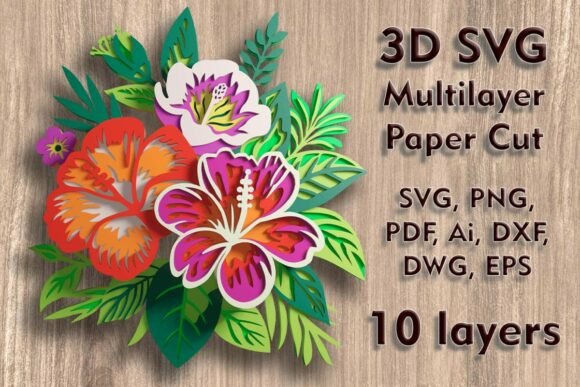
Hibiscus 3D SVG Multilayer PaperCut File
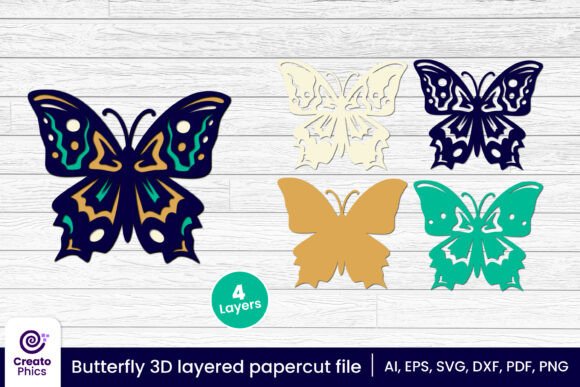
The Hibiscus 3D SVG Multilayer PaperCut File is a digital design file that allows users to create intricate 3D paper cut art using various cutting machines. This file is ideal for crafting enthusiasts, artists, and DIY hobbyists looking to elevate their creative projects with detailed, multilayered designs. The file includes 10 separate layers, making it easy to assemble into a stunning 3D wall art piece or shadow box display.
Measuring 275 H x 250 W mm (10.83 x 9.84 in), the design can be scaled up easily, though care should be taken when reducing the size to maintain the integrity of thin elements. The versatility of this file makes it suitable for a wide range of materials, including plywood, paper, cardstock, MDF, wood, acrylic, cardboard, and aluminum. Whether you're working on a personal project or a commercial endeavor, this file offers flexibility and precision for your creative needs.
How to Use the Hibiscus 3D SVG Multilayer PaperCut File
The Hibiscus 3D SVG Multilayer PaperCut File is designed to integrate seamlessly into your existing workflow. Before starting a project, ensure you have the necessary tools and materials. The file supports multiple formats such as SVG, layered SVG, DXF, DWG, EPS, AI, PNG, and PDF, allowing compatibility with a variety of cutting machines like Cricut, Silhouette, Laser, and CNC routers.
Once you've downloaded the ZIP folder containing the files, you can open them in your preferred design software. For example, if you're using a Cricut machine, you can import the SVG file directly into Cricut Design Space. Similarly, if you're working with a laser cutter, you can use the DXF or EPS format for precise cutting. The layered SVG files make it easy to manage each component of the design separately, ensuring accuracy during the cutting process.
After cutting, the next step is assembling the layers. This process requires careful attention to detail to ensure each layer aligns correctly. You can use glue, double-sided tape, or other adhesives depending on the material you're working with. Once assembled, the final piece can be mounted on a board or placed inside a shadow box for an elegant display.
Integration with Other Tools and Resources
The Hibiscus 3D SVG Multilayer PaperCut File works well with a variety of tools and resources, enhancing your overall creative process. For instance, if you're using a Silhouette Cameo, you can take advantage of its advanced cutting features to achieve high-quality results. Similarly, Glowforge users can leverage the precision of laser cutting to bring the design to life with minimal effort.
When working with multiple layers, it's essential to organize your files effectively. Using a naming convention for each layer can help streamline the cutting and assembly process. Additionally, keeping a backup of your original files ensures that you can revisit or modify the design at any time. This level of organization is particularly useful for those who frequently work on similar projects or need to maintain consistency across different pieces.
For users who are new to SVG files, it may be helpful to familiarize yourself with basic design software before diving into the project. Programs like Adobe Illustrator, Inkscape, or CorelDRAW offer powerful tools for editing and manipulating SVG files. Understanding how to adjust the design, resize elements, or add custom details can greatly enhance the final outcome.
Practical Implementation Tips
To get the most out of the Hibiscus 3D SVG Multilayer PaperCut File, consider the following tips:
- Material Selection: Choose a material that suits your project's requirements. For example, cardboard is ideal for prototyping, while plywood or MDF provides a more durable finish.
- Layer Alignment: When assembling the layers, use a ruler or measuring tape to ensure they are aligned properly. Misalignment can affect the overall appearance of the 3D effect.
- Testing: Before cutting the final pieces, test the design on a smaller scale or with scrap material to identify any potential issues.
- Lighting: If creating a shadow box, consider the placement of lights to highlight the depth and detail of the design.
These tips can help you avoid common pitfalls and improve the quality of your finished product. By taking the time to plan and execute each step carefully, you can achieve professional-looking results without requiring extensive experience or specialized equipment.
Workflow Examples and Use Cases
The Hibiscus 3D SVG Multilayer PaperCut File can be used in a variety of workflows, from personal hobbies to commercial applications. For example, a small business owner might use the design to create custom wall art for a boutique or home decor store. The ability to scale the design allows for flexibility in meeting different customer preferences and space requirements.
Another use case involves educators or workshop facilitators who want to incorporate hands-on activities into their curriculum. By using the file, students can learn about design principles, material properties, and the importance of precision in crafting. This type of project encourages creativity, problem-solving, and teamwork, making it an excellent educational tool.
For individual creators, the file offers a way to express artistic vision through unique, personalized pieces. Whether it's a gift for a loved one or a statement piece for a home, the Hibiscus 3D design adds a touch of elegance and sophistication. With the right tools and techniques, even beginners can produce impressive results.
Long-Term Use and Maintenance
Once completed, the Hibiscus 3D wall art or shadow box can be maintained with minimal effort. Regular dusting and careful handling will help preserve the design's appearance over time. If you plan to use the file for future projects, storing the digital files in an organized manner ensures easy access when needed.
Additionally, staying updated with new design trends and techniques can help you continue to refine your craft. Joining online communities or forums dedicated to SVG cutting and paper art can provide valuable insights and inspiration. These resources can also help you troubleshoot any challenges you may encounter during the process.
The Hibiscus 3D SVG Multilayer PaperCut File is a valuable asset for anyone interested in creating detailed, multilayered paper art. Its flexibility, ease of use, and compatibility with various tools make it an excellent choice for both beginners and experienced creators. By integrating this file into your workflow, you can unlock new possibilities and bring your creative visions to life with precision and style.